Have you recently bought the Canon EOS R6 and wondered how its battery life stacks up against its competitors or larger cameras? If so, you’ve come to the right place.
Many photographers and even videographers used to traditional DSLR cameras got the R6 to try out a much lighter-weight camera that can still do many of the same functions their DSLR cameras do.
Below, we’re not just going to take a look at the official CIPA description of Canon R6 battery life but also how its battery fairs in the wild and what you can do to prolong your Canon R6’s battery life.
How Is Canon R6 Battery Life by CIPA?
When using the LP-E6NH battery that comes with the Canon R6 and it’s fully charged, with the display performance setting on “Smooth,” the CIPA rating is the following:
Picture
250 shots with electronic viewfinder(EVF);
360 shots with live view(LCD screen).
Video
2 hours and 40 minutes at 23°C, when the Movie Servo AF setting is set to OFF and when filming in Full HD 29.97P/25P IPB (standard).
What Is CIPA?
CIPA stands for Japan’s Camera and Imaging Products Association (est. 2002). It uses standardized methods, settings, and temperatures to test how many still images a camera can capture on a single fully charged battery. It also tests how long it can shoot video.
However, it’s mainly helpful in comparing cameras and stacking their CIPA ratings against each other. A camera’s “real world” performance is typically much better than its CIPA performance. This is because the testing methods CIPA employs don’t align with how most photographers use their cameras.
Test Standard: They take photos once every 30 seconds, starting 30 seconds after powering on the camera. They leave it on between shots, then turn it off after every 10 photos, and repeat the process.
How Does the Canon R6 Battery Perform in Real Life?
Most Canon R6 users report a battery life that’s significantly better than the CIPA rating.
For example, getting over 2,000 shots at -10°C on a battery that was only 50% charged. Or getting over 1,100 shots in 2 hours, with the battery still at 50% at the end of shooting.
A structured test in the wild of the R6’s battery life involving stills images and filming demonstrated that it could do 4000+ stills shots over two days, with 27% battery power remaining. The user estimates they would’ve been able to do 5,000 shots before the camera shut down due to low battery.
The results of the filming test are illustrated below:
If you want to compare the differences in LP-E6N and LP-E6NH batteries, this breakdown explains how each one fits the R6.
Battery
Setting
Duration
LP-E6NH
4k/25
107 minutes
LP-E6NH
FHD/25
168 minutes
LP-E6N
4k/25
84 minutes
LP-E6N
FHD/25
130 minutes
So as you can see, from both anecdotal reports and structured tests in the wild, the Canon R6’s battery performs much better in real life than it does with the CIPA test.
How to Prolong Canon R6’s Battery Life?
Many factors affect your R6’s battery life: your shooting mode and style, ambient temperatures, the settings on your R6, tools you use on your R6 and how you use them. Below, I’ll discuss some of these factors and what you can do to prolong your R6’s battery life.
If temperature is affecting your battery life, this guide on Canon R6 overheating may help.
Use EVF More
While the LCD screen is often advantageous, but it also consumes a lot of battery. Using the EVF (electronic viewfinder) will conserve battery power.
Also, it’s best to turn off your LCD screen in between shots and reduce the time that images show up on the screen.
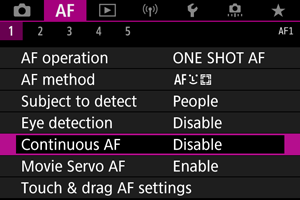
Disable Continuous Autofocus
The autofocus will drain battery power quicker, especially if used continuously. Disable continuous autofocus in the settings on your R6.
The level of brightness on the LCD screen can also affect battery life. If possible, reduce the brightness level of your R6’s LCD screen to a level where you can still comfortably see what’s on the screen, but not above that level.
Editing/Reviewing Images on PC
Editing or reviewing images on your R6 in between shots can also drain battery power. It’s best to do this on your computer or other devices you sync your R6 with or wait until the battery is charging again after the shoot if you prefer to do it on your R6.
Reduce the Usage of Electronic Zoom
Reduce the use of electronic zoom if possible. The zoom function uses a motor, and all motors contribute to draining the battery, so it’s best to assess your shot before using the zoom function.
Avoid Freezing Environments
Temperature can have an outsized effect on battery life, especially in freezing temperatures. This is because the chemical reaction that the battery relies on to sustain its power is slowed down in cold temperatures.
How to Conserve Battery Power in Freezing Temperature?
If you want to extend the battery life in a cold environment, you may also need to take the following measures:
Backup Batteries
You’ll usually need backup batteries in frigid temperatures, as there’s no way to completely circumvent the cold’s effect on your R6’s battery.
Ensure they stay warm in a sealed bag, battery grip, or coat pocket. Backup batteries are also good in other situations, as they’re one of the easiest ways to prolong your shooting time with your R6.
External Electronic Viewfinder
You can use an external electronic viewfinder instead of the built-in one. This will help conserve battery power because an auxiliary EVF can be warmed up and used less frequently than built-in ones.
Manual Focus Lens
Use a manual focus lens instead of relying on your R6’s autofocus. Since a manual focus lens doesn’t require a motor, its function won’t be compromised due to cold temperatures.
Hand Warmer
Wrap a hand warmer around the section of the R6 that contains the batteries. Hand warmers rely on a chemical reaction to release heat and can last quite a while (6 hours or more). They’re safe for cameras because they don’t release as much heat as warmers for larger body parts.
Don’t Leave Your R6 Unprotected
Don’t leave your R6 in the cold unprotected unless you’re actively using it. During intervals between shots, keep it in a sealed bag to keep it and the battery warm.
Should I Buy a Battery Grip for My R6?
If you often use R6 for a long time, then the answer is Yes.
Battery grips can be a handy tool for prolonging your camera’s battery life. It’s an accessory that attaches to the bottom of your camera and holds two additional camera batteries. Many also support AA batteries in addition to a camera battery.
It also usually has a shutter button and sometimes other control buttons, letting you hold the camera via its vertical handle. So, let’s take a look at some of the pros and cons of a battery grip:
Pros:
1. Prolong Camera Battery Life
A battery grip’s main pro is significantly prolonging your camera’s battery life. It does so in a much more convenient manner than having to manually change out your main camera battery (as you would have to do if you only brought backup batteries individually).
This makes a battery grip a handy tool in situations that drain your R6’s battery more, such as the following: cold temperatures, extended video recording, long exposure photography, and time-lapse photography.
2. Better Portrait Shooting
It better supports portrait shooting. The shutter release button and other controls on a battery grip make it easier to shoot in portrait mode, as these can be difficult to access. Also, the vertical handle on a battery grip means you don’t have to twist your wrist to get the right angle in portrait mode.
Some battery grips have an increased frame rate in burst mode.
3. Better Balance
It helps balance your camera if you’re attaching heavier lenses to it, as a small camera like the Canon R6 may not stabilize well on its own with such lenses.
If you have large hands, a battery grip can be easier to hold long-term than the R6.
Cons:
1. Make Your Camera More Bloated
It increases the weight and size of your camera setup. If limiting the amount of space your camera gear takes up and decreasing its weight is essential, a battery grip may not be the best solution.
2. Expensive
Battery grips can be expensive, especially if you’re buying a name-brand one from Canon or Nikon instead of one from a third-party manufacturer.
Overall, I think a battery grip is an essential component of accessory gear to help prolong your Canon R6’s battery life. Even if you don’t use it in all shooting situations, it’ll surely come in handy in cases most prone to draining your R6’s battery.
Conclusion
Fortunately, the Canon R6’s battery performs much better in real life than in CIPA’s testing. A lot of factors affect how long your R6’s battery life will be, including ambient temperature, camera settings, and how you use the tools on your R6. Hope the suggestions above will be helpful you.