
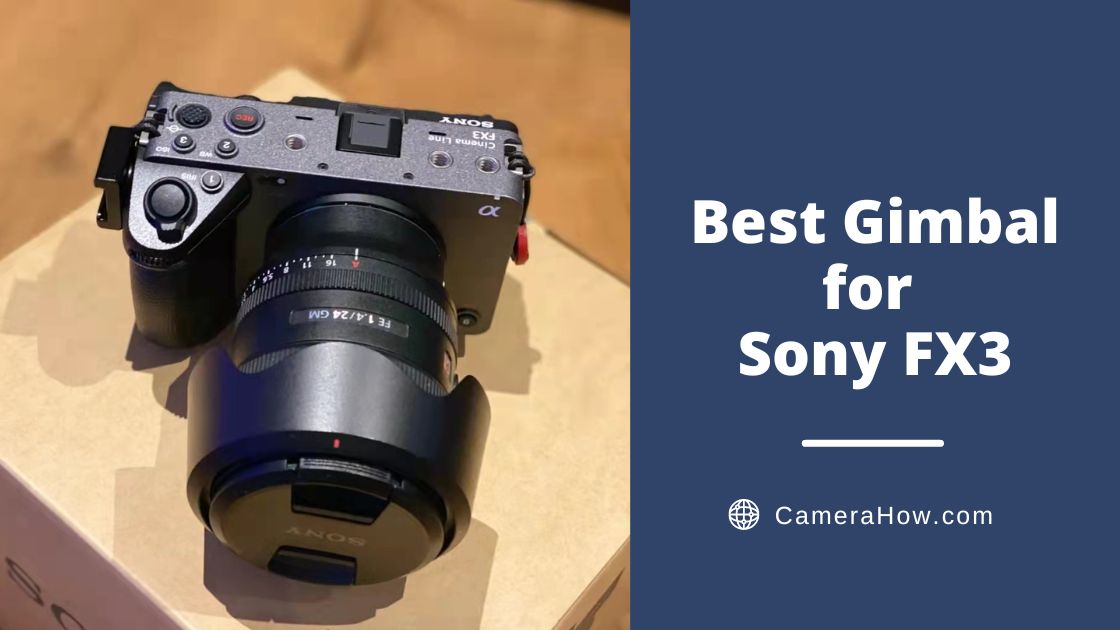
The Sony FX3 won a lot of praise when it was first released. And now, it is a full-frame camera loved by many photographers. I’ve seen so many compliments from friends about this camera. It is beautiful, elegant, compact and lightweight.
Of course, more compliments come from its high pixel count and high capture rate of images.
Although the FX3 comes with anti-shake, you still need a gimbal to get a stable and smooth picture.
All things considered, I would pick DJI RS3 as the best gimbal for Sony FX3. This gimbal has many exclusive and unique features that will take your shooting to the next level. Whether it is portability, stability, or functionality, it is far superior to its competitors. If you’re confused or want to learn more, scroll down.
Best Gimbal for Sony FX3


Let’s start with the DJI RS 3. Yes, when it comes to gimbals, it’s hard to beat DJI, which has been consolidating its technology from the DJI RSC to the RSC2 and now the DJI RS 3. The DJI RS 3 is an excellent gimbal offering photographers professional shooting assistance. The excellent stability and good user experience also make it popular among many photographers.
In addition to its lightweight body and excellent load capacity, it also has a strong stability increase as well as long runtime. In optimizing the user experience, the DJI RS 3 brings auto-unlock, Bluetooth shutter, and a vast touchscreen color display. These are huge updates that are outstanding when used in practice.
Weight&Load
The body of the RS 3 is made up of aluminum, which gives it a very light overall weight. It is only 1.3 kg, which is also a bearable weight with FX3. At the same time, its load capacity is maintained at 3kg, the same as RSC2. But it has a longer axle arm, so there is enough space for larger models.
Reliable Stabilization Algorithm
With the assistance of the 3rd Titan stabilization algorithm, DJI RS3 can provide better stability for images. According to relevant studies, RS3 optimizes jitter to a degree 20% higher than RSC2. Whether running or switching up-to-low camera positions, RS 3 can stabilize the picture. And RS3 has a super stabilization mode, further enhancing the picture’s stabilization effect in some cases.
Autonomous Axis Locks
I would say that the Autonomous axis locks are a genius design. This is one of the reasons why I upgraded to RS3. And in actual use, this design has surprised me even more. It is really helping me to solve the problem of repeated disassembly and installation. In the past, if I wanted to close the gimbal, I had to fold each axis and lock it manually. And when I used them again, I had to unlock them and unfold them again manually.
But when I upgraded to DJI RS3, I completely said goodbye to the above pain points. Because the automatic axis locking can complete the above process in two seconds. Yes, the RS3 can be automatically folded or unfolded in two seconds. In two seconds, RS3 can switch between working and sleeping modes quickly.
The Double Quick-Release Plate
The DJI RS 3 features a double-layer quick-release plate design that has become quite common. It has been proven that a gimbal with a quick-release plate can be fast and safe in disassembling the camera. But the problem is that some other gimbals I’ve used interfere with the camera battery and flash card replacement.
Convenient Button Design
The DJI RS 3 follows the front dial of the RSC2 for quick focus and focus adjustment. In addition to this, the DJI RS3 introduces a new slider for switching modes. There are three modes to choose from, PTF, PF and PV. When you want to switch mode, just slide it instead of going into the menu to find the settings.
Bluetooth Shutter
The DJI RS3’s Bluetooth shutter is a handy feature that can be adapted to Sony’s A7 series and FX3. Once the Bluetooth pairing is successful, you can press the on button below the RS3’s touchscreen to control the camera on or off. And the RS3’s Bluetooth can store the camera’s leveling settings. A camera only needs to be leveled for the first time, and then it doesn’t need to be balanced again every time you turn it on.
Colorful Shooting Experience
On the DJI RS3, you can experience a different kind of shooting. In addition to the conventional vertical shooting and underslung modes, the RS3 can also offer unique features. That contains time delay, 360-degree rotation, crazy mode, and panoramic photography.
High-End Features
Through additional accessories and APP, you can use the more advanced functions of DJI RS3. When you want to photograph birds or cars, you need to track them in real-time. The Ronin image transmission system can use ActiveTrack to follow objects.
At the same time, the Ronin image transmission supports a remote monitoring screen. You can view the live footage taken by the camera on your phone.
Pros
- Excellent weight-bearing capacity (3 kg / 6.6 lbs)
- Effectively simplifies the user experience
- Good battery life (12 hours)
- 1.22-inch full-color touchscreen
- Rich in additional cutting-edge features
Cons
- Some features need to be used with accessories
- Underslung mode requires the extra grips
- Need time to learn


I was using my DJI RSC2 until the day before I upgraded to the DJI RS3, and it was also a good choice for the Sony FX3.
Weight&Load
The DJI RSC 2 is also made of aluminum and weighs 1.3kg, making it compact yet sturdy. The DJI RSC 2 has a load capacity of 3kg, which allows it to carry many mainstream DSLR and mirrorless cameras. The FX3 body weighs 0.64kg, so you can choose more lenses to achieve different effects.
Runtime
The DJI RSC 2 has a non-removable internal battery with a runtime of 14 hours. At the same time, the RSC 2’s battery can be adapted to PD fast charging and 18W fast charging, which can meet the needs of long time shooting.
Titan Stabilization Algorithm
DJI RSC 2 adopts the second generation of the Titan stabilization algorithm, which can bring excellent stability. Even in scenes with a lot of movement, RSC2 can maintain the stability of the image very well. Meanwhile, like DJI RS3, RSC also has a Super Stabilization mode.
Double Quick-Release Plate
DJI RSC2 also has a quick-release plate structure. You can mount the camera directly on the quick-release plate and then attach the plate to the camera. That eliminates the need for secondary leveling and makes it easier to remove the camera to replace the camera battery.
Foldable Structure
Of course, the most outstanding feature of DJI RSC 2 is the unique foldable design. The RSC 2 can easily switch between six different modes with different folding methods. That includes handheld, underslung, flashlight, vertical shooting, and storage. Meet the different shooting environments.
Creative Functions
RSC 2 supports time-lapse, 360 rotation, panoramic photography, and other creative functions. In using the RSC 2, I tried to use the 360 rotating shot to unlock the hidden gameplay of the gimbal. I found a lot of inspiration from these features and discovered many new shooting techniques and tricks.
One-Touch Vertical Shooting
With the popularity of short videos, people are getting increasingly accustomed to using vertical screens to shoot creatively. RSC 2’s unique foldable design allows it to switch between horizontal and vertical shooting quickly. Double-click the M button to enter vertical shooting when holding the gimbal grip vertically. Repeat the operation to return to normal horizontal shooting mode.
Eagle Eye Image Transfer
DJI RSC2 can be used with the eagle eye image transmission. The RSC2 can be more effective when equipped with that function. You can achieve a variety of functions, such as intelligent following and screen monitoring.
Pros
- Excellent load capacity (3 kg/ 6.6 lbs)
- A double quick-release plate
- Vertical shooting and jug mode by folding
- Excellent endurance (14 hours)
- Rich shooting effects
Cons
- The Eagle Eye picture transfer function requires additional accessories
- The 1-inch display is not great
- A foldable structure doesn’t always work


For video workers, a multifunctional gimbal is also quite necessary in addition to a handy camera. On the one hand, a gimbal can ensure stable shooting and further improve the rate of film production. On the other hand, if a gimbal is versatile enough, it will allow the photographer to concentrate more on the art of creating images. That’s why I will mention Weebill 3 here.
Weight&Load
The first subjective feeling when you get the WEEBILL 3 camera gimbal is that it is much lighter than similar products. The “double weight reduction” makes the gimbal really lighter.
Wrist Rest Structure
The bottom of the WEEBILL 3 has a new labor-saving wrist rest. It is covered with a thick and soft silicone front. When you hold the WEEBILL 3, the force of your wrist is carried by this wrist rest. Similar to the principle of leverage, the weight is distributed to the whole arm instead of just using the wrist to carry the mirror. This structure is very energy efficient when used in practice.
Runtime
WEEBILL 3 is also upgraded with PD fast charging, with as fast as 2 hours to 100% full. In a static environment, it can last up to 21 hours.
Built-in Light&Mic
One of the biggest highlights of the Weebill 3 is the built-in fill light and microphone. The fill light uses Lumen Amplifier technology. It supports both brightness and color temperature adjustment. In some dark environments, this fill light can help supplement the contour and surface light. The WEEBILL 3 also offers four different color fill light filters as accessories. These filters can provide rich colors and can simulate special atmospheres such as sunset and sunset.
Customizable Buttons
Zhiyun WEEBILL 3 camera gimbal is also quite attentive to the design details. The front of the gimbal is a 0.96-inch monochrome display. On both sides are the corresponding operation buttons, all customizable. In addition, the Weebill 3 also has a new front scroll wheel and a trigger, which can be customized. You can bind your frequently used functions to these buttons.
Pros
- Wrist rest construction is very labor-saving
- Built-in microphone and fill light
- Long runtime (21 hours)
- Quick release plate
- Customizable buttons
Cons
- Poor touch screen
- not so good APP


Zhiyun’s portable gimbal Crane M series has been upgraded to the third generation. The new Crane M3 is not only lightweight and portable like its predecessors but also has some eye-catching design additions.
Weight&Load
Zhiyun Crane M3 weighs only 0.7kg and is very compact overall. You can put it together with a water bottle for comparison. You will find that the gimbal is smaller. You can set the camera on the M3 first and then put it together in the backpack.
Double Quick-Release Plate
The Zhiyun Crane M3 is equipped with a unique double-layer quick-release version that allows you to mount and release the camera quickly.
Supplementary Light
A unique feature of the M3 is its built-in fill light. This fill light uses Lumen Amplifier technology and supports adjustable brightness. At night and in dim places, M3 can easily cope with it.
Full-Color Touch Screen
Thanks to the M3’s vast color touch screen, the user experience of the Cloud Crane M3 is very clear and intuitive. You can view the various parameters of the gimbal through the clear screen and quickly switch modes and adjust parameters. Even a novice can quickly become familiar with the gimbal and use it.
Runtime
The most worried about shooting outside is not the lack of good material but the fear of equipment without electricity. M3’s battery life is not top-level, but it is enough. Charging about 2 hours of electricity can be used for about 8 hours. In fact, the outdoor shooting day is not so long, so the M3 can fully meet my daily needs. Of course, if the shooting time is longer, you can prepare a rechargeable battery.
Pros
- Small size, light (700 grams/ 1.54 pound)
- Led fill light
- Large full-color touch screen (1.22inch)
- Rubber and metal parts, solid and reliable
- POWER UP FAST
Cons
- Does not support heavy lenses
- Many functions need to be used with the expansion base


Feiyu SCORP-C is an excellent gimbal from Feiyu. It can be equipped with micros, cell phones, digital cameras and sports cameras. Of course, it is also a very good choice FOR XT3, which is very compatible with FX3. And it’s a gimbal that offers vertical shooting and jug modes at an affordable price.
Weight&Load
The body of the Feiyu SCORP-C is made of aluminum and resin. It weighs 1.2kg, and has a load capacity of 2.5kg. This weight capacity is not the best in the industry, but it can meet many common camera and lens combinations.
Double Grip Design
The distinctive feature of the SCORP-C is its double grip structure. It has a grip directly below and an additional grip that tilts upward. This grip allows you to hold the gimbal with both hands to make shooting more effortless. At the same time, it can be used as a carrying handle when switching to vertical shooting or carrying pot mode. You don’t need to buy an extra grip or tripod for it.
Simple Installation and Leveling
The Feiyu SCORP-C is designed to be easy and quick to set up and level through a series of configurations. With the quick-release version, you can disassemble the camera more efficiently. And after leveling once, you can use the sliders near the three-axis locks to record the position. This way, the next time you use it again, you can quickly set and finish leveling with these sliders.
Runtime
The SCORP-C has a runtime of 12 hours. Also, this gimbal has a fast charging system that takes only 1.6 hours to charge fully.
Pros
- High load capacity (2.5kg / 5.5 lbs)
- Double grip design
- quick release plate
- Friendly price
- Long battery life (12 hours)
Cons
- Mis-touch button
- Unstable battery life
- Limited lens support
- Unchangable zone


The DJI RS 3 Pro is an excellent gimbal for DSLR and mirrorless cameras. Sony FX3 is a perfect full-frame camera that can capture cinematic-quality footage. So to fully utilize the capabilities of this camera, you need a more robust and professional gimbal. That’s the DJI RS3 Pro.
DJI RS3 Pro also supports automatic axis lock, Bluetooth shutter, and other functions. It encapsulates the features of the DJI RS3 and further expands on that with features and accessories.
Weight&Load
DJI RS3 Pro uses a carbon fiber process to enhance the gimbal’s strength and reduce the body’s weight. This gimbal has a 4.5kg strong load. And while upgrading the carrying space, it maintains 1.5 kg of weight. That allows it to carry more professional combinations to meet diverse shooting needs. The more extended carbon fiber arm also brings more space and can be adapted to larger models.
LiDAR Focusing
The RS 3 Pro is equipped with the latest LiDAR technology, which allows for a more powerful and intelligent following. This feature greatly reduces the difficulty of following the focus. DJI RS3 Pro’s ActiveTrack is upgraded to Smart Follow Pro, which will identify and track objects more accurately and quickly.
Super Image Transmission
DJI RS 3 Pro’s image transmission distance has been increased to 6km. With more powerful LiDAR technology, the DJI RS3 Pro performs better in both on-screen monitoring and motion simulation.
The DJI RS 3 Pro will be a gimbal that will continue to shine for some time to come, with other handy features, including a fine-tuning knob and a mode switch.
Pros
- Super high load capacity (4.5 kg / 10 lbs)
- Extended carbon fiber axis arms
- LiDAR focusing
- 1.8″ full color touch screen
- Professional grade equipment
Cons
- It takes time to learn
- Some functions require extra parts
What Is a Gimbal?
A gimbal is a camera stabilizer with three axes. Its main purpose is to stabilize the camera and counteract the shake that occurs when it is held up.
If you are shooting handheld, the video is usually full of shake. These shakes are very difficult to deal with, especially when you are running footage.
By cushioning and balancing the three axes against each other, the gimbal can neutralize this shake and make the picture very smooth.
What Do You Need to Consider When Choosing a Gimbal?
Stability
That is the most important feature of a gimbal. The mainstream gimbals on the market today offer tiny variations in stability from one another. But the differences are real, and generally speaking, newer versions of the gimbal will provide better stability.
Compatibility
Compatibility should also be taken into consideration. You should choose a gimbal compatible with most of your cameras and lenses.
Load capacity
Undoubtedly, the higher the load capacity of the gimbal, the better. Because that means you can use more cameras and lenses.
Self Weight
The weight of the gimbal is also a factor that should be considered. But this varies from person to person. A lightweight gimbal would be a good choice for people who like to go out and take pictures. For some vloggers who shoot short videos, the gimbal’s weight may not be too concerning.
Runtime
Does the gimbal come with fast charging? Is the range of the gimbal can meet the time of your work at a time? All these should be taken into account.
Cost
You can pick the best gimbal for you based on your budget and the features you are interested in. The most expensive gimbal may not be the most suitable for you. You don’t have to spend extra money for features you may not use.
Easy to Use
A gimbal that’s easy to use can save you a lot of learning time. A user-friendly gimbal is often a good choice for photographers who want to get up and running quickly and produce a finished product.
Extra Features
Many gimbals have extra features. Choose the ones you are interested in
Does Sony FX3 Have Image Stabilization?
Yes, the Sony FX3 has five-axis stabilization and works very well when taking photos.
However, you may run into some trouble if you want to use this feature to shoot videos. One of the problems is that your arm will frequently enter, causing you to have one reshoot at a time. And another problem is that if you turn on video stabilization, it will crop the frame. That has the potential to destroy your footage.
Is a Gimbal Better Than Ibis?
That depends on what you’re shooting. The IBIS is good enough if you like to shoot photos and only occasionally shoot some videos. Of course, the IBIS can also be helpful when shooting still life. You just need a tripod to hold the camera.
However, a gimbal is a way to go if you need to use the video function frequently. Both Sony’s stabilization and super stabilization modes will crop out part of the frame, which in some cases, can ruin the sense of coordination of your footage.
Of course, in addition to providing stability, many of today’s gimbals have additional features. These features can provide a shooting experience far beyond that of a handheld camera. The famous ActiveTack, for example, can help you automatically track birds or cars when you want to shoot them. You may lose them in seconds when you’re shooting with a handheld camera.
Conclusion
Through the above introduction, you should have understood some of the features and functions of the gimbal. I think you must have already picked the right gimbal for your FX3 in your mind.
Although there are a lot of gimbals on the market, it is not difficult to pick the right one for you as long as you are clear about your needs.
Now, let’s take action. Use the gimbal with the camera and shoot exciting shots.